Small and silent
A small desktop binary, light memory use, fast launch, and a UI that stays out of the way.
FAST · SMALL · SILENT
Your agents run where the work lives. Close the app and they keep going.
Tiny footprint
Written in Rust - a ~10 MB binary that sips memory.
Detached sessions
Sessions live on the machine, so agents keep running.
Multi-node fleet
Pair any Mac, Windows, or Linux machine in seconds
Built-in MCP server
Spawn and steer agents from other agents
Encrypted connection
No inbound ports or tunnel to maintain
WATCH THE INTRO
Open terminals, launch coding agents, arrange a fleet, pair worker nodes, and let MCP orchestrate the whole workspace.
Why Strix
Strix is named after owls - compact, quiet, and aware. One canvas to build software with the help of many AI agents, tools, and skills.
A small desktop binary, light memory use, fast launch, and a UI that stays out of the way.
Rotate from one project to another, then into the wing that matters now. Keep local and remote processes in view without turning the app into a heavy IDE.
Each feather is one job: a shell, SSH session, file view, browser pane, or agent CLI. Arrange only what you need and let the rest keep running.
A codebase or working directory with its own icon, color, launchers, and saved state.
One focused layout inside a project. Switch wings when the work changes.
A running tool on a local or remote node: Claude Code, Codex, OpenCode, and other agent CLIs, plus SSH, files, web, or a plain shell.
NODES
Add a node once, then launch many feathers on it. Your desktop app remains the silent controller while your laptop, a Mac mini, or a Linux server keep terminals and modern agent CLIs alive.
Name a node in the app, press Generate, and run the one-line command it gives you on any Mac, Windows, or Linux machine. No inbound firewall rules or tunnel to maintain.
Run Claude Code, Codex, OpenCode, and other agent CLIs, plus SSH and shell processes, on the machine where the work should happen.
The node keeps every terminal running. Close Strix and your agents keep working as long as the machine is on.
The app's local hub dials each node over an end-to-end encrypted overlay. The relay forwards ciphertext only - it can't read your traffic - and our servers never see project names, paths, or terminal output.
SEE IT IN ACTION
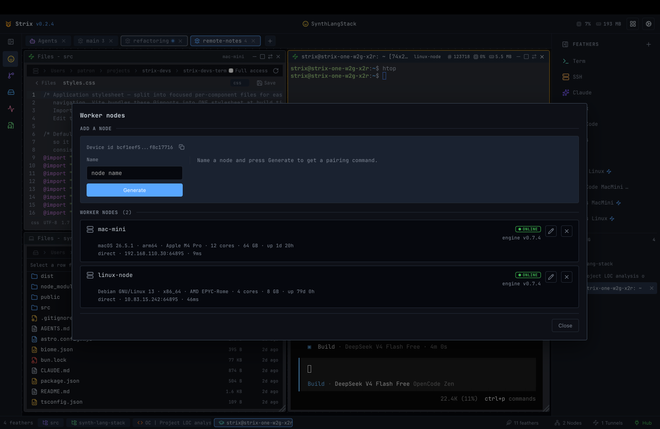
Name a node in the app and press Generate. Run the one-line pair command it gives you on the target machine, and it joins as a worker - no inbound firewall rules, no tunnel service.
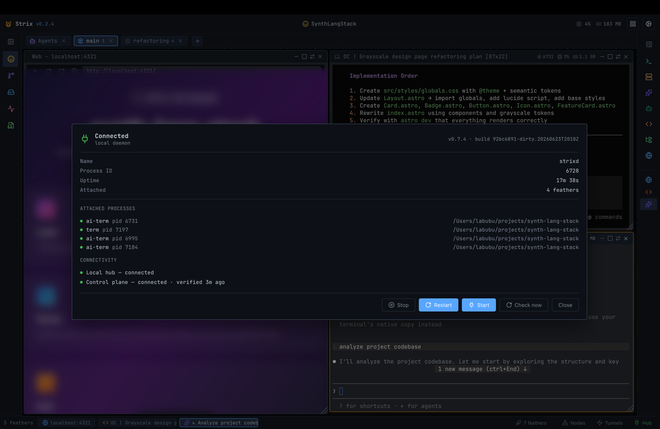
The node owns the terminals. Quit Strix and your agents keep running, then reattach later with full scrollback intact.
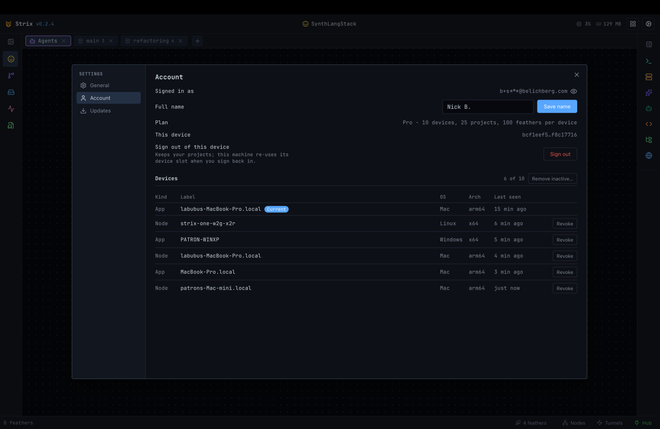
Every app and node is its own device. See them all and revoke any old machine from the app - your projects stay exactly where they are.
AUTOMATE
Strix speaks the command line and a built-in MCP server, so you can spawn, watch, and steer terminal agents - yourself or from another agent - across every paired node.
Pair nodes, list sessions, and launch feathers from the command line - no app window required.
A built-in MCP server lets one agent spawn, watch, and steer other agents running in your terminals.
List and drive sessions on all your paired nodes from one place; the node keeps them alive after the app closes.
Features
Built to stay quick and lean: written in Rust - a tiny, fast desktop app that stays light on memory, with no heavyweight workspace ceremony.
Drag, resize, and snap feathers into the shape of the current task. Keep several wings per project and move between them fast.
Save commands for Term, SSH, Claude Code, Codex, OpenCode, and other agent CLIs, plus files and web panes, so a project opens with the right tools ready.
Every stream is compressed, so remote terminals and live file views stay responsive over slow or distant links.
Map a file or folder from a remote node read-only and watch it update live as the work on that node changes it.
Attach a live session from another Strix app on the same node - pick up on a laptop what you started on a desktop.
POWER TOOLS
Open and edit files in a built-in code editor with syntax highlighting and themes, on a local or remote node - right next to the terminal that's changing them.
Upload and download files or whole folders between your machine and any paired node, with live progress and copy/move conflict handling.
Live CPU and memory for every session and remote node, so you see which worker is busy without leaving the canvas.
Attach the same live session from another Strix app and take over input - pair on a problem or move a long-running task between machines.
Drop a screenshot straight into an agent CLI like Claude Code; the clipboard image rides into the terminal feather.
Tunnel a TCP or Unix socket from a paired node to your machine over the encrypted overlay - no inbound firewall rules, no tunnel service.
Pricing
Downloads stay anonymous. Strix asks for an email code on first launch, then unlocks your plan inside the app.
For a small personal setup across apps and nodes.
forever
For one developer running more projects and machines.
€150 per year
For shared nodes and cross-account pairing inside a team.
€150 per seat / year · min 5 seats
For private infrastructure, white-labeling, and custom controls.
contract
FAQ
Any command-line tool - Claude Code, Codex, OpenCode, and other agent CLIs, plus plain shells and SSH. Strix runs them as feathers; it doesn't wrap or replace them.
Yes. The node owns the terminals, so agents keep running after you quit Strix. Reopen and reattach with full scrollback.
Only the basics needed to run your account and devices - never your project names, paths, or terminal output. Per-device limits are enforced on the client, so your work stays on your machines.
No. Nodes dial out to an encrypted relay that forwards ciphertext only. No inbound firewall rules and no tunnel service to maintain.
Yes. Strix never blocks on the network at startup, and a dropped connection won't sign you out - a periodic check-in just refreshes your plan when you reconnect.
The Free plan covers 3 devices with 5 projects and 25 feathers each, forever. Paid plans raise those limits and add team pairing.
Grab the desktop app for your canvas, then install the node anywhere you want terminals and agent CLIs to keep running.
Anonymous download · sign in only on first launch
CONTACT
Have feedback, a bug, or a question? Send us a message - we read every one.
Message sent
Thanks for reaching out - we'll get back to you soon.